<?xml version="1.0" encoding="utf-8"?>
<html xmlns="
http://www.w3.org/1999/xhtml" xml:lang="en" lang="en">
<head>
<style type="text/css">
/*
:Author: David Goodger (
goodger@python.org)
:Id: $Id: html4css1.css 9511 2024-01-13 09:50:07Z milde $
:Copyright: This stylesheet has been placed in the public domain.
Default cascading style sheet for the HTML output of Docutils.
Despite the name, some widely supported CSS2 features are used.
See
https://docutils.sourceforge.io/docs/howto/html-stylesheets.html for how to
customize this style sheet.
*/
/* used to remove borders from tables and images */
.borderless, table.borderless td, table.borderless th {
border: 0 }
table.borderless td, table.borderless th {
/* Override padding for "table.docutils td" with "! important".
The right padding separates the table cells. */
padding: 0 0.5em 0 0 ! important }
.first {
/* Override more specific margin styles with "! important". */
margin-top: 0 ! important }
.last, .with-subtitle {
margin-bottom: 0 ! important }
.hidden {
display: none }
.subscript {
vertical-align: sub;
font-size: smaller }
.superscript {
vertical-align: super;
font-size: smaller }
a.toc-backref {
text-decoration: none ;
color: black }
blockquote.epigraph {
margin: 2em 5em ; }
dl.docutils dd {
margin-bottom: 0.5em }
object[type="image/svg+xml"], object[type="application/x-shockwave-flash"] {
overflow: hidden;
}
/* Uncomment (and remove this text!) to get bold-faced definition list terms
dl.docutils dt {
font-weight: bold }
*/
div.abstract {
margin: 2em 5em }
div.abstract p.topic-title {
font-weight: bold ;
text-align: center }
div.admonition, div.attention, div.caution, div.danger, div.error,
div.hint, div.important, div.note, div.tip, div.warning {
margin: 2em ;
border: medium outset ;
padding: 1em }
div.admonition p.admonition-title, div.hint p.admonition-title,
div.important p.admonition-title, div.note p.admonition-title,
div.tip p.admonition-title {
font-weight: bold ;
font-family: sans-serif }
div.attention p.admonition-title, div.caution p.admonition-title,
div.danger p.admonition-title, div.error p.admonition-title,
div.warning p.admonition-title, .code .error {
color: red ;
font-weight: bold ;
font-family: sans-serif }
/* Uncomment (and remove this text!) to get reduced vertical space in
compound paragraphs.
div.compound .compound-first, div.compound .compound-middle {
margin-bottom: 0.5em }
div.compound .compound-last, div.compound .compound-middle {
margin-top: 0.5em }
*/
div.dedication {
margin: 2em 5em ;
text-align: center ;
font-style: italic }
div.dedication p.topic-title {
font-weight: bold ;
font-style: normal }
div.figure {
margin-left: 2em ;
margin-right: 2em }
div.footer, div.header {
clear: both;
font-size: smaller }
div.line-block {
display: block ;
margin-top: 1em ;
margin-bottom: 1em }
div.line-block div.line-block {
margin-top: 0 ;
margin-bottom: 0 ;
margin-left: 1.5em }
div.sidebar {
margin: 0 0 0.5em 1em ;
border: medium outset ;
padding: 1em ;
background-color: #ffffee ;
width: 40% ;
float: right ;
clear: right }
div.sidebar p.rubric {
font-family: sans-serif ;
font-size: medium }
div.system-messages {
margin: 5em }
div.system-messages h1 {
color: red }
div.system-message {
border: medium outset ;
padding: 1em }
div.system-message p.system-message-title {
color: red ;
font-weight: bold }
div.topic {
margin: 2em }
h1.section-subtitle, h2.section-subtitle, h3.section-subtitle,
h4.section-subtitle, h5.section-subtitle, h6.section-subtitle {
margin-top: 0.4em }
h1.title {
text-align: center }
h2.subtitle {
text-align: center }
hr.docutils {
width: 75% }
img.align-left, .figure.align-left, object.align-left, table.align-left {
clear: left ;
float: left ;
margin-right: 1em }
img.align-right, .figure.align-right, object.align-right, table.align-right {
clear: right ;
float: right ;
margin-left: 1em }
img.align-center, .figure.align-center, object.align-center {
display: block;
margin-left: auto;
margin-right: auto;
}
table.align-center {
margin-left: auto;
margin-right: auto;
}
.align-left {
text-align: left }
.align-center {
clear: both ;
text-align: center }
.align-right {
text-align: right }
/* reset inner alignment in figures */
div.align-right {
text-align: inherit }
/* div.align-center * { */
/* text-align: left } */
.align-top {
vertical-align: top }
.align-middle {
vertical-align: middle }
.align-bottom {
vertical-align: bottom }
ol.simple, ul.simple {
margin-bottom: 1em }
ol.arabic {
list-style: decimal }
ol.loweralpha {
list-style: lower-alpha }
ol.upperalpha {
list-style: upper-alpha }
ol.lowerroman {
list-style: lower-roman }
ol.upperroman {
list-style: upper-roman }
p.attribution {
text-align: right ;
margin-left: 50% }
p.caption {
font-style: italic }
p.credits {
font-style: italic ;
font-size: smaller }
p.label {
white-space: nowrap }
p.rubric {
font-weight: bold ;
font-size: larger ;
color: maroon ;
text-align: center }
p.sidebar-title {
font-family: sans-serif ;
font-weight: bold ;
font-size: larger }
p.sidebar-subtitle {
font-family: sans-serif ;
font-weight: bold }
p.topic-title {
font-weight: bold }
pre.address {
margin-bottom: 0 ;
margin-top: 0 ;
font: inherit }
pre.literal-block, pre.doctest-block, pre.math, pre.code {
margin-left: 2em ;
margin-right: 2em }
pre.code .ln { color: gray; } /* line numbers */
pre.code, code { background-color: #eeeeee }
pre.code .comment, code .comment { color: #5C6576 }
pre.code .keyword, code .keyword { color: #3B0D06; font-weight: bold }
pre.code .literal.string, code .literal.string { color: #0C5404 }
pre.code .name.builtin, code .name.builtin { color: #352B84 }
pre.code .deleted, code .deleted { background-color: #DEB0A1}
pre.code .inserted, code .inserted { background-color: #A3D289}
span.classifier {
font-family: sans-serif ;
font-style: oblique }
span.classifier-delimiter {
font-family: sans-serif ;
font-weight: bold }
span.interpreted {
font-family: sans-serif }
span.option {
white-space: nowrap }
span.pre {
white-space: pre }
span.problematic, pre.problematic {
color: red }
span.section-subtitle {
/* font-size relative to parent (h1..h6 element) */
font-size: 80% }
table.citation {
border-left: solid 1px gray;
margin-left: 1px }
table.docinfo {
margin: 2em 4em }
table.docutils {
margin-top: 0.5em ;
margin-bottom: 0.5em }
table.footnote {
border-left: solid 1px black;
margin-left: 1px }
table.docutils td, table.docutils th,
table.docinfo td, table.docinfo th {
padding-left: 0.5em ;
padding-right: 0.5em ;
vertical-align: top }
table.docutils th.field-name, table.docinfo th.docinfo-name {
font-weight: bold ;
text-align: left ;
white-space: nowrap ;
padding-left: 0 }
/* "booktabs" style (no vertical lines) */
table.docutils.booktabs {
border: 0px;
border-top: 2px solid;
border-bottom: 2px solid;
border-collapse: collapse;
}
table.docutils.booktabs * {
border: 0px;
}
table.docutils.booktabs th {
border-bottom: thin solid;
text-align: left;
}
h1 tt.docutils, h2 tt.docutils, h3 tt.docutils,
h4 tt.docutils, h5 tt.docutils, h6 tt.docutils {
font-size: 100% }
ul.auto-toc {
list-style-type: none }
</style>
</head>
Atomic theme
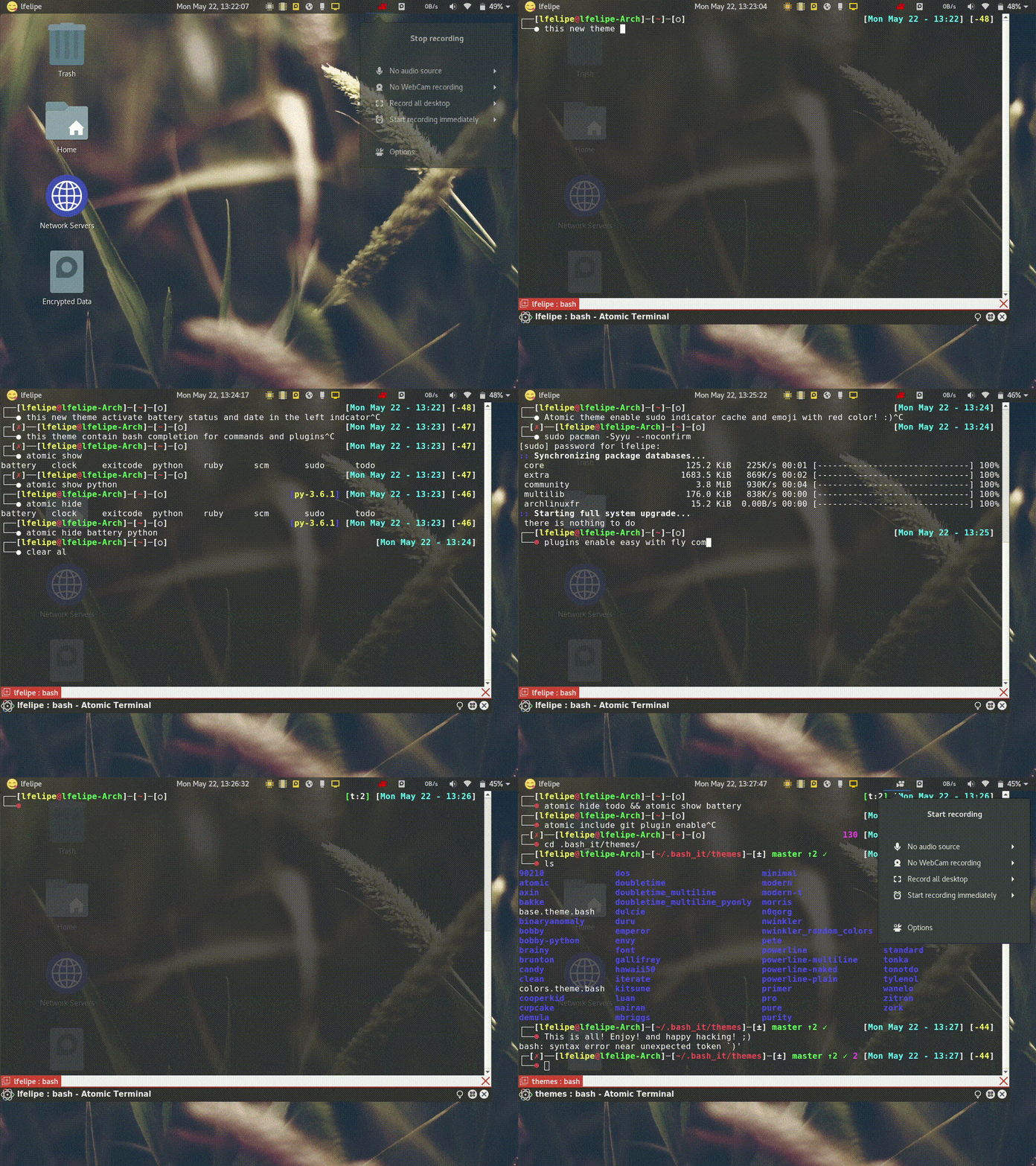
The Best ColorFull terminal prompt theme inspired by a number of themes and based on the theme of @MunifTanjim :ref:`brainy <brainy>`.
System Message: ERROR/3 (<stdin>, line 6); backlink
Unknown interpreted text role "ref".
Supported on all operating systems.
In constant maintenance and improvement
Install Theme
Manually
You can install the theme manually by following these steps:
Edit your modified config ~/.bashrc file in order to customize Bash-it, set BASH_IT_THEME to the theme name atomic.
Examples:
System Message: WARNING/2 (<stdin>, line 29)
Cannot analyze code. Pygments package not found.
.. code-block:: bash

   # Use the "atomic" theme
   export BASH_IT_THEME="atomic"
Automatically via terminal
- You can install the theme automatically using the sed command from your Linux or OSX Terminal.
- On macOS, the ~/.bash_profile is used, not the ~/.bashrc.
- For installation on windows you should use ``Git-Bash` <https://git-for-windows.github.io/>`_ or make sure the terminal emulator you use (ej: cygwin, mintty, etc) has the sed command installed.
Command to execute For Windows and Linux:
System Message: WARNING/2 (<stdin>, line 44)
Cannot analyze code. Pygments package not found.
.. code-block:: bash

   # Set the "atomic" theme replacing the theme you are using of bash-it
   sed -i 's/'"$BASH_IT_THEME"'/atomic/g' ~/.bashrc
Command to execute for macOS:
System Message: WARNING/2 (<stdin>, line 51)
Cannot analyze code. Pygments package not found.
.. code-block:: bash

   # Set the "atomic" theme replacing the theme you are using of bash-it
   sed -i '' 's/'"$BASH_IT_THEME"'/atomic/g' ~/.bash_profile
Features
Prompt Segments
- Username & Hostname
- Current Directory
- SCM Information
- Battery Charge
- Clock
- Todo.txt status
- Ruby Environment
- Python Environment
- Exit Code
Others
- Indicator for cached sudo credential
- Indicator for abort (ctrl + C) the current task and regain user control
- atomic command for showing/hiding various prompt segments on-the-fly
Configuration
Various prompt segments can be shown/hidden or modified according to your choice. There are two ways for doing that:
- On-the-fly using atomic command
- Theme Environment Variables
On-the-fly using atomic command
This theme provides a command for showing/hiding prompt segments.
atomic show <segment>
atomic hide <segment>
Tab-completion for this command is enabled by default.
Configuration specified by this command will only be applied to current and subsequent child shells.
Theme Environment Variables
This is used for permanent settings that apply to all terminal sessions. You have to define the value of specific theme variables in your bashrc (or equivalent) file.
The name of the variables are listed below along with their default values.
User Information
Indicator for cached sudo credential (see sudo manpage for more information):
THEME_SHOW_SUDO=true
SCM Information
Information about SCM repository status:
THEME_SHOW_SCM=true
Ruby Environment
Ruby environment version information:
THEME_SHOW_RUBY=false
Python Environment
Python environment version information:
THEME_SHOW_PYTHON=false
ToDo.txt status
Todo.txt status:
THEME_SHOW_TODO=false
Clock
THEME_SHOW_CLOCK=true
THEME_CLOCK_COLOR=$bold_cyan
Format of the clock (see date manpage for more information):
THEME_CLOCK_FORMAT="%H:%M:%S"
Battery Charge
Battery charge percentage:
THEME_SHOW_BATTERY=false
Exit Code
Exit code of the last command:
THEME_SHOW_EXITCODE=true
Prompt Segments Order
Currently available prompt segments are:
- battery
- char
- clock
- dir
- exitcode
- python
- ruby
- scm
- todo
- user_info
Three environment variables can be defined to rearrange the segments order. The default values are:
___ATOMIC_TOP_LEFT="user_info dir scm"
___ATOMIC_TOP_RIGHT="exitcode python ruby todo clock battery"
___ATOMIC_BOTTOM="char"
Development by
Developer / Author: Luis Felipe Sánchez
This work is licensed under the Creative Commons Attribution 4.0 International License. To view a copy of this license, visit http://creativecommons.org/licenses/by/4.0/ or send a letter to Creative Commons, PO Box 1866, Mountain View, CA 94042, USA.
</html>
